
Mini Me AI Video
Upload one photo and meet the little you everyone is posting about: a child version of you, in a mini copy of your outfit, walks in, stands beside you and strikes your pose. 8 seconds, $6.99, no account, and a free 3-second preview before you pay.
Aussi connu sous le nom :mini me filtermini me trendmini version of me AI
- 6,99 $US en un seul paiement
- Aucun compte requis
- Vidéo de 8 secondes avec son
- Remboursement intégral en cas d'échec
- Sans filigrane
Créez votre vidéo
Importez une photo et payez une seule fois. Nous écrivons l'histoire pour vous.
Aucun compte requis. Tout rendu échoué est intégralement remboursé.
Ou créez votre propre version dans le studio de prompts
Il s'agit d'un parcours distinct et personnalisé : écrivez la scène de votre choix, choisissez la durée et payez avec vos crédits. La vidéo à 6,99 $ ci-dessus est la version toute prête : vos photos, un scénario imposé et sans compte.
Copiez-collez ces prompts Mini Me AI Video
“Use the uploaded photo as the opening frame: the adult in it stands facing the camera. A small child version of the same person, about six years old, with the same face shape, eyes, smile, hair color and skin tone, walks in wearing a child-sized copy of the adult’s outfit and stops beside them. 0-3 s: the child walks in. 3-5 s: the adult looks down and laughs. 5-8 s: both strike the same pose at the camera and the child waves. Preserve the original face. Static camera, 9:16, no text.”
“An adult sits at a café table and lifts a cheerful toddler, about two years old, onto their lap. The toddler has the same eyes, smile, hair color and skin tone as the adult, like a tiny copy, and wears a little version of the adult’s sweater. The toddler reaches for the adult’s face, both laugh, and they look at the camera together. Warm window light, handheld phone feel, 9:16, wholesome, no text, no logos.”
“An older woman sits in a garden chair on a sunny porch with flowers. A little girl of about five with the same face, the same smile and the same cardigan in a child size walks up holding an orange and sits in the small chair beside her. They look at each other, laugh, then both smile at the camera. Soft afternoon light, static shot, photorealistic, 9:16, no text.”
Qu’est-ce que Mini Me AI Video ?
Mini Me AI is the name people search for a short video in which they appear next to a small child version of themselves. The child has their face, their smile and their hair, and wears a tiny copy of their outfit, so the two look like the before and after of the same person standing in one frame. It started as a CapCut template and an AI filter on TikTok, with captions like “this effect reveals your mini version” or “meet your mini me”, and it has been one of the most used AI templates of the year.
It works because everyone is curious about it. People wonder what they looked like as children, parents wonder what their child would have looked like if they took after them completely, and friends love comparing the result with real childhood photos in the comments. The matching outfit is the visual joke: a toddler in a tiny leather jacket or a little business blazer looks sweet and a little absurd. Grandparents with a mini me in a matching cardigan are some of the most shared versions.
On this page there are two ways to make one. The ready-made video at the top takes one photo of you and gives you the tested 8-second moment: your mini me walks in, you laugh, and you both strike the same pose, with no account. Further down, the prompt studio lets you write your own version: a baby in your arms, a different place, a longer scene or a growing-up timeline. Either way, use a clear photo, keep the outfit visible, and post it in 9:16 with the trend sound added in TikTok or Reels.
Copier le prompt
“A warm, cheerful clip filmed like a phone video, photorealistic. An adult stands facing the camera in a bright everyday setting and smiles. A small child version of the same person, about six years old, with the same face shape, eyes, smile, hair color and skin tone, wearing a child-sized copy of the adult’s outfit, walks in and stops beside them. The adult laughs in surprise, then both turn to the camera and strike the same pose, and the child takes the adult’s hand and waves. Both faces visible, 9:16, no text, no logos.”
01
What you upload and what you get
One photo in, one finished Mini Me AI video out. There is nothing to write, nothing to tune and no account to create.
You upload one clear photo of yourself, waist-up or full-body, as JPG, PNG or WebP, up to 10 MB each. We turn it into a single 8-second video in 720p with natural scene sound, in 9:16 for TikTok, Reels and Shorts or 16:9 for a wider picture. There is no watermark, and the file is yours to post.
- You bring
- One photo with a clearly visible face, and a tick to confirm the person in it is an adult who agreed to be in the video.
- You get
- One MP4, 8 seconds, 720p, with sound and no watermark, on a private order page you can open for 14 days.
- It takes
- Usually 5 to 10 minutes. You can leave the page and come back through the same link; the video keeps rendering without you.
- It costs
- $6.99 once, paid before the render starts. No subscription and no extra charge for the download.
02
The story your photo becomes
The story is fixed on purpose. Every order gets the same tested moment, so the result looks like the Mini Me trend you came for, not a random experiment.
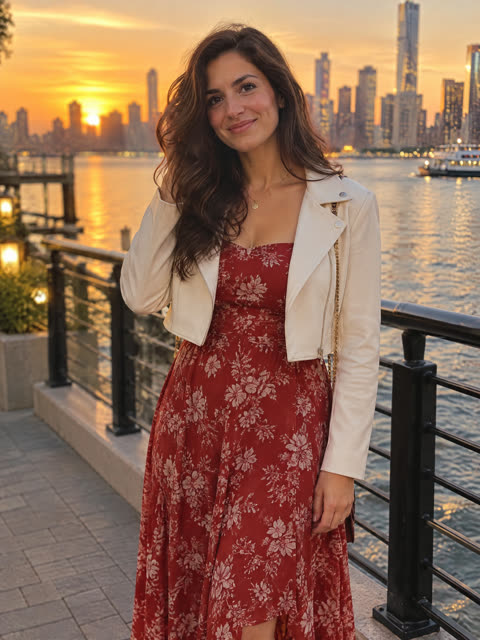
The video opens on you, in the outfit and the kind of place from your photo, smiling at the camera. Then a small child walks in from the side and stops right next to you. It is you at about six years old: the same face shape, eyes, eyebrows, smile, hair color and skin tone, and a child-sized copy of exactly what you are wearing. You look down, laugh in surprise, and then the two of you turn to the camera and strike the same pose side by side. In the last second your mini me takes your hand and gives a small wave, with both faces clear and in focus.
Your mini me is not taken from your childhood photos. The AI works out what you probably looked like as a child from the face in the photo you upload, the same way the CapCut Mini Me filter does, so think of it as a very good guess rather than a record. People who post it usually say the eyes and the smile are what make it land. The outfit matters more than you might expect: whatever you wear in the photo, your mini me wears too, so a bold jacket, a team jersey or a bright dress makes the matching look obvious at a glance.
 Photo
 Photo
 Photo
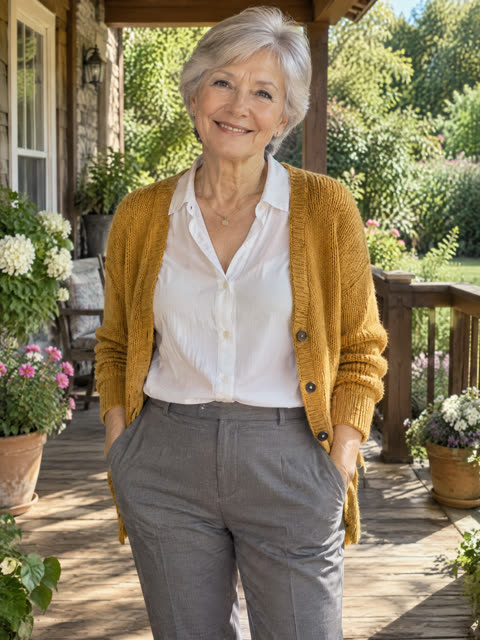
Real results from test orders, each sent exactly as a buyer’s order is: one photo in, the 8-second video out, no editing. The people in these photos are AI-generated, not customers.
03
Which photos work best for a Mini Me AI video
The video is only as good as the face it starts from. A minute spent choosing the photo saves a lot of disappointment.
- Face clearly visible
- Your mini me is built from your face, so pick a photo where it is sharp, well lit and looking at the camera or slightly turned. The clearer the eyes and the smile, the closer the resemblance.
- Waist-up or full-body
- A photo that shows your outfit works best, because the child wears a mini copy of it. A tight face-only selfie leaves the AI guessing what you are wearing.
- Just you in the photo
- Use a photo of one adult. If there are several people, we cannot tell whose mini me to make, and other faces can leak into the child.
- No sunglasses or heavy filters
- Sunglasses, masks, beauty filters and big stickers hide the features your mini me inherits, so the child looks less like you. Natural light and your everyday look work best.
04
Choose 9:16 for Reels or 16:9 for a wider story
Pick the shape before you pay. It is part of the order and cannot be changed after the render starts.
Choose 9:16 if you will post to TikTok, Instagram Reels or YouTube Shorts: the clip fills the phone screen and the face stays large. Choose 16:9 if you want a wider scene, for example for YouTube, a slideshow or a TV, where the surroundings have more room.
05
How delivery, downloads and privacy work
There is no account, so your private order link is the key to your video. Keep it.
Right after payment you land on your order page. It shows the progress, then plays the finished video and gives you a download button. The page stays available for 14 days, and this browser also remembers your recent orders. Anyone who has the link can open the video, so do not share it publicly.
Your photo is used only to make this one video. It is deleted as soon as the video is finished, or when the order is refunded. The finished video is deleted when the 14 days are over, and the order page then tells you it has expired. Order pages are not indexed by search engines.
06
Mini Me AI video pricing
One price, one video. You pay before the render starts, and you are refunded automatically if we cannot deliver it.
| What | Details |
|---|---|
| Price | $6.99 one-time, in USD, paid by card through Stripe |
| Video | 8 seconds, 720p, with natural sound, no watermark |
| Formats | 9:16 vertical or 16:9 wide |
| Account | Not needed |
| Delivery | Private order page, available for 14 days |
| If it fails | One automatic retry, then a full refund to your card |
07
Baby, toddler and growing-up versions
The paid video above shows a school-age mini me standing beside you. Holding a baby version of yourself, or watching yourself grow up, is a different shot that you can make with your own prompt.
The Mini Me trend has three popular looks. The side-by-side version, with a matching outfit and the same pose, is what the ready-made video makes. The “if I had a mini me” version shows you holding a baby or toddler with your face, and the growing-up version turns one face from child to adult in a single shot. For the last two, use the prompt studio further down this page: the prompt cards include a baby-in-arms version, and the age progression page has prompts written for a full growing-up timeline.
08
Key features of the prompt studio for a custom mini me
For a version of your own, with a baby, a different place, another age or a longer scene, paid with credits. These are the parts the studio handles for you.
- Your photo as the opening frame
- Upload a clear photo of yourself and it becomes the first frame, so the adult in the video starts from a real picture and the child is built from the same face. Add “preserve the original face” to keep you looking like you.
- A ready-made prompt in the composer
- The prompt at the top of this page is already loaded in the composer. Use it as it is, or change the age, the place and the pose. Every prompt on this page drops in with one click.
- Any age for the mini me
- Write the age you want, from a baby in your arms to a ten-year-old. Name it as a number: “about two years old” gives a far more consistent child than “young” or “little”.
- Longer scenes and more beats
- Seedance 2.5 renders up to 30 seconds, so your mini me can walk in, play, copy a few of your moves and wave goodbye. Give each beat two or three seconds and keep both faces in frame.
09
The three beats of an 8-second mini me reveal
This is the moment the ready-made video uses, and it is a good base for your own. Name the time of each beat in the prompt.
| Time | What happens | How to write it |
|---|---|---|
| 0–3 s | The mini me walks in | “a small child version of the same person walks in from the side and stops beside them” |
| 3–5 s | The surprise | “the adult looks down and laughs in surprise” |
| 5–8 s | Same pose, a wave | “both turn to the camera and strike the same pose; the child takes the adult’s hand and waves” |
10
How to make the mini me look like you
The resemblance is what people comment on, so it is worth getting right. A video model cannot see your childhood; it can only follow your face and your words.
Name the features the child should share, one by one: face shape, eyes, eyebrows, smile, hair color and skin tone. A prompt that only says “a child who looks like them” leaves the model free to invent a generic child. Saying “as if taken from their own childhood photos” helps it keep the proportions of a real child rather than a shrunken adult.
- Name the features
- Eyes, smile and hair carry most of the likeness. List them in the prompt so the model keeps them.
- A child, not a small adult
- Give an age and ask for a child’s proportions: a rounder face, bigger eyes, a shorter body. Without it, some renders look like a miniature grown-up.
- Same outfit, child size
- Say “a child-sized copy of the adult’s outfit”. The matching clothes tell viewers who the child is before they study the face.
- Faces to camera at the end
- Finish with both faces turned to the camera and in focus. That last frame is what people pause on and screenshot to compare.
11
Outfits and places that suit the trend
The look sells the joke before anyone moves. A recognizable outfit and a simple place keep the eye on the two of you.
- Bold, simple outfits
- A red dress, a denim jacket, a suit or a team jersey reads instantly in mini size. Busy patterns blur on a small child.
- City lights at dusk
- A skyline behind you gives the glamorous “mini me effect” look from the original templates.
- Home, café or porch
- An everyday place feels real and warm, and suits the “if I had a mini me” version best.
- Studio backdrop
- A plain grey or white backdrop turns it into a portrait shoot and puts all the attention on the matching look.
12
Settings by where you will post
Decide the destination before you render. It changes the ratio and how much of the two of you shows.
| Where | Aspect ratio | What works |
|---|---|---|
| TikTok, Reels, Shorts | 9:16 | You in frame from the first second, the mini me walking in by second three, the trend sound added in the app |
| Family group chat | 9:16 | Send it next to a real childhood photo and let everyone compare |
| Instagram feed | 4:5 | A closer frame so both faces and the matching outfit fill the picture |
| YouTube or a slideshow | 16:9 | A wider scene with room for the child to walk in from the side |
Comment créer Mini Me AI Video
- 1
Add your photo or pick a prompt
Upload one clear, well-lit photo of yourself, waist-up or full-body, with your face and outfit visible. Only use a photo of an adult who agreed to it. Or skip the photo and start from one of the prompt cards above.
- 2
Set the age, the outfit and the beats
The trend prompt is already in the composer. Write the mini me’s age as a number, name the features it shares with you, ask for a child-sized copy of your outfit, and end with both faces at the camera.
- 3
Generate, check the likeness and download
A clip usually takes a few minutes. Check that the child looks like you and that both faces end in focus, retake with one change if not, then download in 9:16 and add the trend sound when you post.
Idées de Mini Me AI Video
Grandparent and mini me
An older face next to its five-year-old self is the version people share most.
Office twins
A tiny you in a suit at the next desk is the funniest workplace version.
Matching gym session
Your mini me copies your warm-up in the same tracksuit.
Kitchen helper
Cooking together in matching aprons feels warm and unplanned.
City night glam
The skyline version from the original templates.
Mirror reveal
You look in the mirror and the reflection is your mini me.
Erreurs fréquentes de Mini Me AI Video — et comment les corriger
Erreur
The child looks like a stranger
La correction
Use a sharp, front-facing photo and list the shared features in the prompt: face shape, eyes, eyebrows, smile, hair color and skin tone. Add “as if taken from their own childhood photos”.
Erreur
The mini me looks like a tiny adult
La correction
Give an age as a number and ask for a child’s proportions: a rounder face, bigger eyes, shorter limbs. “About six years old” works better than “small” or “mini”.
Erreur
The outfits do not match
La correction
Describe the outfit completely, top and bottom, and say “a child-sized copy of the adult’s outfit”. Use a photo where your clothes are visible, not a face-only selfie.
Erreur
Your own face changes
La correction
Add “the adult keeps the exact face from the reference photo” and keep the adult facing the camera most of the time. Avoid big turns and hands over the face.
Questions sur Mini Me AI
Des réponses courtes et directes aux questions posées avant de se lancer.
- How do I make the Mini Me AI video from one photo?Open the Mini Me AI page on dimly.art, upload one clear photo of yourself, waist-up or full-body, and watch a free 3-second preview of your mini me walking in. If you like it, pay $6.99 once and get the 8-second 720p video in a few minutes: a child version of you, in a mini copy of your outfit, strikes your pose beside you. There is no app to install and no account to create.
- Is there a free Mini Me AI video maker?Partly. On dimly.art you upload one photo and watch a free 3-second preview of your mini me walking in, with no account and no card. The full 8-second 720p video costs $6.99, paid once, with no watermark and no subscription. The fully free route is a CapCut template inside the app, which works on your photo but adds the CapCut branding and needs the app.
- Mini Me AI on dimly.art or the CapCut template: which should I use?Use the CapCut template if you already have the app and want the trend sound built in for free. Use dimly.art if you want it from one photo in your browser, with no app and no account: you watch a free 3-second preview, then pay $6.99 once for a 8-second 720p video with no watermark, where your mini me walks in and strikes your pose.
Plus de tendances virales
Explorez d’autres tendances vidéo IA
Chaque page de tendance ci-dessous transforme une photo ou un prompt en vidéo courte prête à publier, avec des prompts tout prêts, les réglages pour chaque plateforme et les erreurs courantes expliquées.
- Générateur de vidéo Halloween IA — Maisons hantées, fêtes de citrouilles et révélations de déguisement.
- Vidéo IA de couple zombie — Peur, reconnaissance, une étreinte et un souvenir heureux en 8 secondes.
- Vidéo IA de balai volant — Courses, trajets quotidiens et vols au clair de lune sur un balai.
- Transformation en armure de fruits (IA) — Un fruit devient l’armure que vous portez.
- Caresse d’animal (IA) — Une caresse douce transforme les couleurs d’un animal en votre armure.
- Vidéo IA de voiture volante — Propulseurs allumés, un bond, et par-dessus le bouchon.
- Christmas Dance AI Video — Two photos, matching pajamas, one 8-second duo dance by the tree.
- Wassup in a Minute AI Video — Three photos, one misty hillside, one 8-second trio dance with your friends.
- Vidéo IA de monstre géant — Une créature gigantesque dans un lieu parfaitement ordinaire.
- Vidéo IA de poursuite (scène d’action) — Balanciers, piqués et survols avec une caméra de blockbuster.
- Vidéo IA de monde miniature — Un petit monde vivant dans une flaque, une tasse, une étagère.
- Vidéo IA stop motion (papier) — Livres pop-up, créatures de papier et charme artisanal.
- Animer une photo avec l’IA — Faites cligner, bouger et prendre vie n’importe quelle image fixe.
- Vidéo IA surréaliste du quotidien — Une seule chose impossible, dans un lieu parfaitement normal.
- AI Toy to Real Video Generator — A toy on the table, then the real thing in the driveway.
- AI Knight Sword Swap Video Generator — A tiny knight lowers his sword. A giant guardian offers flowers.
- AI Dolly Zoom Effect Generator — The subject stays put. The whole world behind it stretches.
- AI Earth Zoom Effect Generator — From the whole planet to one front door, in a single dive.
- AI Birthday Video Prompts — Candles, confetti and one warm clip to send.
- AI Ecommerce Product Video Generator — One product, one clean shot, ready for the listing.
- AI Christmas Video Generator — Santa visits, sleigh rides, snowy streets and festive reveals.
- First Time in a Fancy Cafe AI Video — Sitting on the table, coffee in hand, until someone shows you how.
- AI Age Progression Video — Watch one face grow from child to grandparent in seconds.
- AI Thanksgiving Video Generator — Dinner tables, autumn light and a thank-you worth sending.
- AI Baby Dance Video Generator — One baby photo, one tiny dance, endless replays.
- AI Pet Dance Video Generator — Your dog or cat, finally showing off the moves.
- AI Robot Arm Steals Phone — Mid-selfie, a robot arm reaches in and takes the phone.
- AI Bicep Heart Trend — Flex, then turn both arms into one big heart.
- Prix et crédits du studio de prompts
- Voir toutes les tendances vidéo IA
Mini Me AI Video — questions fréquentes
Mis à jour le 17 nov. 2026
It costs $6.99 once for one finished 8-second 720p video with sound and no watermark. You pay by card through Stripe before the render starts. There is no subscription and no extra fee for the download.
No. You upload one photo, tick the confirmation, pay, and land on a private order page. Your order link is the key to the video, so keep it. This browser also remembers your recent orders.
Usually 5 to 10 minutes after payment. The render runs in the background, so you can close the page and open your order link again later.
If the render fails, we retry it once automatically. If it still fails, the order is refunded in full to your card and the order page says so. If a render finishes but you are not happy with it, email support@dimly.art with your order link and we will look at it.
One clear photo of yourself, waist-up or full-body, well lit, with the face large and visible. Avoid sunglasses, masks, heavy filters and photos with several people. JPG, PNG and WebP up to 10 MB each are accepted.
They are used only to make your video and are deleted as soon as it is finished or the order is refunded. The finished video is deleted after 14 days.
Only if every person in the photos is an adult and has agreed to appear in the video. You confirm this with a tick before you pay. Photos of children, or of people who did not agree, are not allowed.
Yes. Choose 9:16 for TikTok, Reels and Shorts, or 16:9 for a wider picture. You pick it before you pay, and it cannot be changed once the render has started.
The ready-made video is 8 seconds long. For other lengths or your own scene, use the prompt studio further down this page, which is a separate path paid with credits.
The result is made to be non-graphic and suits TikTok, Instagram and YouTube. Platforms may ask you to label AI-generated content, so add the label they require when you post.
About six years old: small enough to look clearly like a child next to you, and old enough to walk in, copy your pose and wave. That age reads best on a phone screen. For a baby or toddler version, use the prompt studio below.
It will look like a child version of the face in your photo: the same eye shape, eyebrows, smile, hair color and skin tone. It is the AI’s best guess, not a copy of your childhood photos, so it may not match your real kid pictures exactly. A sharp, front-facing photo gets the closest result.
The video is rendered by ByteDance’s Seedance 2.5 video model, which dimly.art reaches through the Kie API. Your photo is sent there only to make your video, and our copy is deleted as soon as the video is finished or the order is refunded. The finished video sits on your private order page, which search engines do not index.
A render that fails is retried once and then refunded automatically. If the video is delivered but does not follow the story on this page, or you are not recognizable in it, email support@dimly.art with your order link within 14 days: we re-render it for free when that can fix it, and refund in full when it cannot. Your mini me’s face is the AI’s guess at your childhood look, so how closely it matches your real kid photos is not a defect; that is what the free preview is for. The full rules are on the refund policy page.
It makes the same kind of video: you and a little version of you in matching clothes, side by side. It does not use any CapCut template, creator video or song, and dimly.art is not affiliated with CapCut or TikTok. You do not need the app, and the faces in the video come from your photo.
It is a short video or photo in which you appear next to a small child version of yourself, with your face, your smile and a tiny copy of your outfit. It started as a CapCut template and an AI filter on TikTok, and people post it to see what they might have looked like as a child.
Yes. Start from the “If I had a mini me” prompt card, set the age to about one or two years old, and describe you holding the child on your lap. Keep it to a short, calm moment: lifting, laughing and looking at the camera render well.
Only with a photo of an adult who agreed to it. Ask them first, and use a clear photo of them alone. Never use photos of children or of people who did not agree.
A 5-second clip usually takes one to three minutes, and you can keep chatting while it renders. Seedance 2.5 goes up to 30 seconds if you want a longer scene, and MiniMax H3 renders 5 to 15 seconds.
You get free credits when you sign up, so you can try your first clips in the prompt studio without paying. After that, videos use credits, charged per second of finished video, and failed renders are refunded automatically.
No. dimly.art does not add a watermark, so you can post the download straight to TikTok, Reels or Shorts.
Add music in TikTok, Reels or your editor afterwards, and only use tracks you have the rights to; trend sounds are usually licensed for use inside the app only. All paid plans include a commercial license for the video itself.
Non. Cela fonctionne dans n'importe quel navigateur — aucune application à installer, aucun template à chercher. La page que vous lisez est le studio : ajoutez une photo, collez le prompt, lancez le rendu.
ChatGPT peut créer une image fixe de l’idée, mais pas cette vidéo. La vidéo Mini Me AI vient d’un modèle image-vers-vidéo, et cette page fait tourner Seedance 2.5 pour vous : importez votre photo, regardez un aperçu gratuit et payez une seule fois le clip terminé, sans prompt à écrire.
Un template remonte le clip de quelqu'un d'autre et ne peut pas vous placer dans la scène. Cette page rend votre propre version à partir de votre photo, et les clips payants se téléchargent sans filigrane.
Créez votre Mini Me AI Video dès aujourd’hui
Gratuit pour commencer — votre premier clip n’attend qu’un prompt.